Showing posts with label laptop. Show all posts

Saturday, October 29, 2011

WD Scorpio Blue 1TB ( Western Digital ) Review

ReviewEverywhere.Blogspot.Com
The need for large-capacity storage media continues to increase, including for portable computer / notebook (laptop) users. Well, Western Digital (WD) Scorpio Blue 1TB try to answer those needs.

Although made ​​in a 2.5-inch form factor but this product is classified as having a large capacity, which is 1 TB. Not only that, this hard drive also has a pretty good specs, as much as 8 MB cache, 5400 RPM, SATA interface and uses 2-speed 3 Gb / s.

As for size, despite its large size but the thickness of the WD Scorpio Blue 1TB is only about 9.5 mm, thinner than previous product the same capacity that is 12.5 mm. This means this product can be used almost in all the notebooks in circulation. Then what about performance?

Blue frill on a 1TB WD Scorpio Blue indicates that this product has a performance of the middle class. Black Label for upscale and Green for the line of energy-efficient hard drive. So before buying a user can decide in advance which ones as needed.

For performance 1TB WD Scorpio Blue is promising. When used to copy a file of 8.74 GB average speed of this product is stuck at 19 MB / sec. As a result, it took about 7 minutes to complete the process.

That's when used to copy files using TeraCopy application, whereas when tested using HD Tune Pro 4.61 applications on average speed of these products reach 86 MB / s, with a maximum speed of 112 MB ​​/ sec and a minimum of 34 MB / sec. Not fast enough?

Besides promising adequate performance of these products are also equipped with features WD Advanced Format Hard Drive, which is a new standard classification for each sector of hard drive.

Typically, most hard drives will write data blocks with 512 bytes per sector, while these products can be larger at 4 MB per sector. Impact, the amount of the truncated when formatted capacity will be less than before. But surely there is a need specialized applications and hardware that is sufficient to enjoy the feature.

In conclusion, although not as yet the fastest hard drives WD Scorpio Blue 1TB is still quite reliable with an average speed of 86 MB / s. That alone is enough if it is used as the primary hard drive, and excellent when used as a second hard drive.

Specifications 1TB WD Scorpio Blue
  • Form Factor: 2.5 "x 1/8H (100.2mm x 69.85 x 9.5mm)
  • Capacity: 1.0 TB
  • Interface: Serial ATA-300
  • Buffer: 8 MB
  • Seek Time: 12.0 ms
  • Average Latency: 5:50 ms
  • Spindle Speed​​: 5400 RPM
  • Power Use: 1:40 Watts Read / Write, 0:59 and 0:18 Watts at idle Watts Sleep / Standby

Friday, July 1, 2011

Asus G74S For High Class Gamer Laptop Review

ReviewEverywhere.Blogspot.Com
Asus G74S, is the latest variant of the family of the Republic of Gamers that is intended for the gaming enthusiast. So no wonder, if this product is reinforced with top-class specifications.

Despite carrying the advanced spec, but the product in this class do not usually give priority to the display. Call it the appearance of large, heavy, with colors that seem stiff.

Shown Large and Sturdy
Talk about the display, Asus G74S does have a large enough size. 17.3-inch screen size 1920 X 1080p resolution, weighing nearly 4kg including battery 8 cell 5200mAh Li-Ion battery that drives his life.

All parts of the body color of the product is wrapped with black, with the Asus logo on the top that looks so shiny. The combination of the right, to give the impression of elegance.

In addition, this notebook also has a hinge made ​​from aluminum of other metal materials combined edge section to give a solid impression. That is what led to this notebook feels heavy, but strong enough to accompany gamers.

Asus Notebook G74S is not only optimal for gaming. This product is equipped with a Blu-ray drive, HDMI port, and a brilliant screen that adds pleasure when watching High Definition (HD).

High Class Specifications
Asus G74S has the innards that spelled out pretty awesome. Intel Core i7 processor 2630QM 4 cores 8 threads running at a speed of 2GHz, while the chipset is reinforced by the Mobile Intel Express HM65. Strong enough to play all the latest games.

Gamers also need not worry about going out of memory. Because, Asus G74S has 16GB of DDR3 1333 MHz RAM that is optimized with wondows 7 64bit. As for the graphics card of this product have a Nvidia GeForce 500 series with a capacity of 3GB DDR5 GPU GF116. So how about performance?

Tests performed using application 3DMark vantage detikINET product is able to carve the figure of 41,283 for 7893 for the CPU and GPU, overalls reach 9893 in Performance mode.

To play some gamers like Bulletstrom or Spiderman Shattered Dimensions of this product is still very easy to handle, but when trying to play COD: Black Ops at a resolution of 1920 X 1080 3D mode this notebook looks a bit overwhelmed.

But the regrettable is the sound quality dimiliknya. There was a 'sober' enough without the bass boom, or a high tone of detail, all standard. Though innards diusungnya already very sophisticated.

More and Real with 3D Display
In addition to a robust physique, upper-class specifications, there are other things that are very interesting from Asus G74S, which is capable of displaying images in three dimensions. This is one feature of the Nvidia 3D Vision.

To enjoy these features, users are required to wear special glasses and also some applications that support. Until now there were hundreds of game titles, movies, and even 3D images that support the Vision.

The result? Simply amazing. Images as if he wanted out of the monitor, just like the 3D technology used in theaters. Just because it uses active glasses, it will show symptoms of flicker when dirungan filled lamp.

Judging from the spec, features, and the price of $ 2309 or about USD 19.7 million so obviously if this product is targeting the deep-pocketed gamers. Interested in having them?

Pros:
+ Spesifkasi upscale
+ 3D Support
Picture + brilliant
Body + solid

Disadvantages:
- Weight
- Sound is not good

Friday, June 10, 2011

Toshiba Portege R835-P56X Laptop Review

ReviewEverywhere.Blogspot.Com
Performance
Processor
    Intel® Core™ i5-2410M processor
Operating System
    Genuine Windows 7 Home Premium (64-bit)
Graphics Engine
    Mobile Intel® HD Graphics
Graphics Memory
    64MB-1696MB dynamically allocated shared graphics memory

Memory and Storage
Memory
    4GB DDR3 1333MHz memory
Hard Drive
    640GB HDD (5400rpm)
Optical Drive
    DVD-SuperMulti drive (+/-R double layer)

Audio and Video
Display Size
    13.3" widescreen
Display Type
    HD TruBrite® LED Backlit display with Intel® Wireless Display Technology
Display Resolution
    Supports 720p content, 16:9 aspect ratio, 1366x768 (HD)
Audio
    Microphone jack (mono), Headphone jack (stereo), Standard stereo speakers

Communication
Webcam
    Webcam and microphone built into LCD bezel
Wireless LAN
    Intel® Wi-Fi® Wireless networking (802.11b/g/n + WiDi Capable)
Bluetooth
    No Bluetooth (No Antenna)
Modem
    No Modem port
LAN
    10/100/1000 Ethernet LAN

Power
AC Adapter
    65W (19V 3.42A) Auto-sensing, 100-240V / 50-60Hz input
Battery
    Li-Ion (66Wh, 6-Cell)

Expansion
PC Express Slot
    No PC Express Slot
SmartCard Reader
    No SmartCard Reader slot
Media
    Memory Card Reader
USB Ports
    1-eSATA/USB (2.0) combo port with Sleep and Charge*, 1-USB (3.0) port*, 1-USB (2.0) port
HDMI
    HDMI output port

Software, Support and Security
Security and Protection
    Password Security, Security Cable Lock Slot, TOSHIBA Supervisor Password Utility, HDD Recovery
Software
    Microsoft® Office Starter 2010 (Reduced functionality Word® and Excel® with advertising), TOSHIBA Hard Drive Impact Sensor (3D sensor), TOSHIBA Face Recognition, TOSHIBA DVD Player, WildTangent Game Console, Microsoft® Silverlight™ , TOSHIBA Bulletin Board™, TOSHIBA Service Station, Norton Internet Security™ 2011 (30-day trial), TOSHIBA Recovery Disk Creator, TOSHIBA Web Camera Application, TOSHIBA HDD/SSD Alert, TOSHIBA Media Controller, TOSHIBA PC Health Monitor, Intel® Wireless Display Technology 1.2, Microsoft® Windows Live Essentials including Photo Gallery, Messenger, Mail, Writer and Movie Maker., Microsoft® Windows Media Player 12, TOSHIBA ReelTime™, TOSHIBA eco Utility™, Google® Chrome
Standards
    RoHS Compliant, Energy Star Qualified, EPEAT™ Gold
Standard Limited Warranty
    1-Yr Parts and Labor, 1-Year Battery

Physical Description
Inputs and Controls
    touch pad on/off, touch pad pointing device with multi touch control, Premium Spill-resistant Raised Tile Keyboard (black)
Weight
    Starting at 3.2lbs.
Color
    Magnesium Alloy Casing in Blue

Wednesday, June 8, 2011

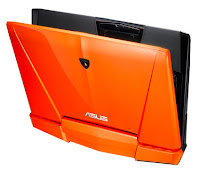
ASUS Automobili Lamborghini VX7 Special Edition Specification

ReviewEverywhere.Blogspot.Com
Processor    Intel® Core™ i7 2630QM Processor
Operating System    Genuine Windows® 7 Ultimate 64bit
Chipset    Intel® HM65 Express Chipset
Memory    DDR3 1333 MHz SDRAM, 4 x SO-DIMM socket for expansion up to 16 G SDRAM
Display    16'' 16:9 Full HD (1920x1080) LED Backlight
Graphic    NVIDIA® GeForce® GTX 460QM with 3GB GDDR5 VRAM
Storage    750GB 7200rpm With 2 G SSD
Optical Drive    
  1. Super-Multi DVD
  2. Blu-ray Writer
  3. Blue-ray reader
Card Reader    8 -in-1 card reader ( SD/Mini-SD/ MS/ MS Pro/ MS Duo/MS Pro Duo/ xD/ MMC)
Camera    2.0 Mega Pixel web camera
Networking    
  1. Built-in Bluetooth™ V2.1+EDR (Optional)
  2. 10/100/1000 Base T
Interface   
  • 1 x Microphone-in jack
  • 1 x Headphone-out jack (SPDIF)
  • 1 x VGA port/Mini D-sub 15-pin for external monitor
  • 1 x USB 3.0 port(s)
  • 3 x USB 2.0 port(s)
  • 1 x RJ45 LAN Jack for LAN insert
  • 1 x HDMI
Audio    
  1. Built-in 2 Speakers And Digital Array Microphone
  2. Built-in Azalia compliant audio chip, with 3D effect
Battery    8Cells : 5200 mAh 75 Whrs
Power Adapter    
  • Output : 19.5 V DC, 7.7 A, 150 W
  • Input : 100 -240 V AC, 50/60 Hz universal
Dimensions    40.2 x 30.9 x 5.00 ~5.79 cm (WxDxH)
Weight    3.82 lbs (with 8 cell battery)
Security    Kensington lock
Manufacturer Warranty    
  • 2-year limited global hardware warranty. *different by country
  • 1-year battery pack warranty
  • On-line problem resolution through web interface (BIOS, Driver update)
  • OS (Windows 7 ) install/uninstall consultation
  • Bundled software install/uninstall consultation
  • ASUS software supporting

Friday, May 20, 2011

Dell Latitude E5420 Laptop Product Review

ReviewEverywhere.Blogspot.Com
Processor
    * Intel® CoreTM i7 (2620M)
    * Intel® CoreTM i5 (2540M, 2520M, 2410M)
    * Intel® CoreTM 2 Duo (T6670)
    * Intel® CoreTM i3 (2310M)
    * Intel® Celeron® (925)

Operating System
    * Genuine Windows® 7 Home Premium 32-Bit
    * Genuine Windows® 7 Professional 64-Bit
    * Genuine Windows® 7 Home Premium 64-Bit
    * Genuine Windows® 7 Professional 32-Bit

Memory
    * o Up to 8GB4 DDR3 SDRAM at 1333Mhz - 2 DIMMS

Chipset
    * Mobile Intel® HM65 Express Chipset

Video Card
    * Intel® HD Graphics 3000

Display
    * 14.0” HD (1366x768) Anti-Glare LED
      14.0” HD+ (1600x900) Anti-Glare LED

Hard Drive
    * Up to 500GB5 hard drive (7200RPM)
    * Up to 250GB5 hard drive (5400RPM)
    * Up to 128GB5 Solid State hard drive

Optical Drive
    * DVD-ROM, DVD+/-RW

Connectivity
    * 10/100/1000 Gigabit Ethernet

      Wireless LAN and WiMAX Options:

      Intel® Centrino® Advanced-N 6205
      Intel® Centrino® Advanced -N + WiMAX 6250
      Intel® Centrino® Ultimate-N 6300
      Dell Wireless 1501 (802.11 b/g/n 1x1)
      Dell Wireless 1530 (802.11 a/g/n 2x2)

      Mobile Broadband6 & GPS Options:

      Dell Wireless™ 5630 Multi-mode HSPA-EVDO Mini Card (Gobi™ 3000) with A-GPS
      Dell Wireless™ 5550 Single-mode HSPA Mini Card with A-GPS

      Bluetooth Option:

      Dell Wireless 375 Bluetooth® 3.0

Multimedia
    * High Quality Speakers
      Stereo headphone/Microphone combo jack
      Integrated, noise reducing array microphones
      Optional Integrated HD video webcam and Dell Webcam Central software

Ports, Slots & Chassis
    * Network connector (RJ-45)
      USB 2.0 (4) – 1 USB/eSATA combo
      Stereo headphone/Microphone combo jack
      Memory card reader, 54 mm ExpressCard, 1394
      Docking Connector, VGA, HDMI
      1 Full and 2 Half Mini Card Slots
      Optional SmartCard Reader, PC Card

      Dimensions & Weight7

      Width: 13.78" / 350mm
      Height: (front/back) 1.18"/29.90 to 1.28"/32.5mm
      Depth: 9.45" / 240mm
      Starting weight: 4.50lbs / 2.04kg (with 4-cell battery and airbay)

      Input

      Single pointing or Dual Pointing Keyboard: Standard or Backlit
      Multi-touch Touchpad

Power
    * 4-cell (40Whr) Lithium Ion battery with ExpressCharge™
      6-cell (60Wh) Lithium Ion battery with ExpressCharge™
      9-cell (97Wh) Lithium Ion battery
      9-cell (97Wh) 3 Year Limited Hardware Warranty3 Lithium Ion battery

      Power Options

      65 Watt or 90W AC Adapter
      90W Auto/Air DC adapter (optional)

Regulatory
    * Regulatory Model: P16G
      Regulatory Type: P16G001
      Energy Star 5.0
      EPEAT Gold

Systems Management
    * DASH 1.1

Wednesday, May 18, 2011

Lenovo ThinkPad Edge E420s Laptop Product Review

ReviewEverywhere.Blogspot.Com
Professional image.
You want your small business to stand out; your business tools can help. This laptop projects an image of smart professionalism with progressive design features like the elegant, moss-black, soft-touch finish; authentic polished metal accents; eye-catching infinity glass display; and clean, comfortable, island-style keyboard. Wrap it up in a thin, light package that's easy to bring on any trip or to any meeting, and you have a laptop that tells the world you're here — and you mean business.

Ambitious performance.
What's style without substance? The E420s is hard-working to its core. Or maybe that should say "cores" — as in, quad cores. Thanks to its 2nd generation Intel® Core™ processors with Turbo Boost and Hyper-Threading, this laptop is responsive, fast and powerful enough to keep the pace with your most aggressive young entrepeneurs. The CPU is 20% faster and handles multitasking with ease. Enhanced Experience 2.0 with its business optimization and faster startup and shutdown times enhances your productivity. Ample memory and storage — up to 8GB DDR3, 320GB HDD and 128GB SSD — mean this workhorse can handle whatever your professionals can throw at it.
   
Responsible reliability.
It might look different, but the E420s retains the vaunted ThinkPad reliability. You can rest at ease knowing it has a spill-resistant keyboard, Active Protection System™ and Rescue and Recovery® to protect your data and a tough-as-nails magnesium-aluminum construction with reinforced metal hinges for durability. Fingerprint ID lends an added measure of protection and standard security tasks run in the background, keeping your data safe while you work. And you're not the only one who can rely on this laptop — the environment can, too, thanks to a level of energy efficiency that complies with ENERGY STAR 5.0 and EPEAT® Gold standards.

Stand-out extras.
Small details make a big difference. The E420s offers convenient features to make your work easier: a 720p HD webcam and keystroke noise suppression software for the ultimate VoIP experience; multiple connectivity options; InstantResume for minimal downtime after sleep mode; wireless display technology; an integrated ThinkLight for usage in low light; a sleek, slot-loading DVD drive; HDMI 1.4 for external display of high-def content; DirectX® 11 for powerful, realistic video rendering in discrete graphics mode; and Dolby® Home Theater® 4 for premium sound.
     
Accessories on the edge.
Enjoy true mobility as you power your laptop and cell phone (or other handheld device) with the Lenovo 90W Ultraslim AC/DC Combo Adapter -- perfect at a desk, on the road or in the air. Or connect it to the Lenovo USB 2.0 Port Replicator with Digital Video, giving you easy access to four USB 2.0 devices, a VGA analog or DVI digital monitor with up to 1920 x 1200 resolution, stereo audio in/out and integrated Ethernet. And be sure to protect your investment from theft with a Kensington Microsaver Cable Lock.

source : lenovo.com